Cappuccino /
Comedy = Time / Tragedy ? /
Comedy = Tragedy + Time
This is meant to suggest that a tragedy, once not so fresh in everyone's memory, will be suitable material for a joke. However, this equation also suggests something else; that you don't need much time to have passed at all, provided you had a colossal enough tragedy.
Seeing as that doesn't seem to be true, there has to be a more accurate generalization. A better formulation could be:
Comedy = Time / Tragedy
In this way we retain the comedy-boosting properties of time, without allowing a huge tragedy to positively affect the comedy factor. And the bigger the tragedy, the more time has to pass in order to reach maximum comedy levels.
However, this still leaves the definition of comedy stubbornly dependent on some sort of tragedy. If there's no tragedy at all, comedy will be undefined. Hopefully this drawback will be addressed by future developments in advanced comedy theory.
ArcBreaker /

Spin your way to victory!

FlipClock is now Open Source /
Get it on GitHub.
Moving to the Bay Area Part II: A New Hope (in the East Bay) /
DAY 2: Sunday
The next day I felt demoralized, thinking it could very well be a while before I found a place. But, having spent the previous day walking around the city and seeing a few places, I wondered if I might find some better values across the bay.
Before flying out, I'd read some suggestions about living in the East Bay and commuting into the city for work. When I finally flew into San Francisco and hopped in a cab, I asked my cabby if he had any opinion on the matter; San Francisco or East Bay: "For you? Young Guy, just live in the city. Maybe go to the East Bay when you look for a house." Noted, Cab Guy, but after the prices and claustrophobic spaces I'd seen on Saturday, I was ready to look to the East Bay.
My host was very enthusiastic about her adopted town of Oakland, but I was hesitant to consider it. Maybe it's just because I grew up in a relatively small town in the Midwest, but crime isn't really something I've ever had to consider when apartment hunting. But Oakland has its fair share of crime; enough to warrant its own crime-tracking website:
http://oakland.crimespotting.org
Though a hipster's paradise and a landing spot for many making the exodus from San Francisco (as noted in the aforementioned "Why Are All My Friends Moving to Oakland?"), Oakland just wasn't for me. At least not yet; maybe I'll warm up to the idea.
So I searched online for areas in the East Bay with low crime rates, and that sent me looking farther inland, near the Walnut Creek area. It looked promising enough, so I found a couple of places to go look at. I hopped onto a BART train and headed East. Hopping off the station, I took an instant liking to the area; it had kind of a familiar small-town feel. Plus I'd seen that it had lots of trails and a reservoir with a jogging path around it. The only downside was that since the crime was much lower here, naturally that meant that this was an area people flocked to to raise their spawn. I figured I could put up with it as long as the lines at Coldstone weren't too long.
While in the area I was able to see two apartments, and get applications for both. Normal applications; no stool sample required. Of the two, I much preferred the second apartment. A two bedroom at $1700, I felt it was a steal compared to the places I'd just seen the day before. I chatted with the fellow showing me the apartment, gave him my little apartment resumé, and went on my way. I'd decided I liked it. I liked the place so much, that I filled out the application for it right away, scanned it with my iPhone, and emailed it to the landlord within half an hour of seeing the place.
The next morning, I got a call from the apartment I'd applied for. It was the landlord saying the place was mine if I wanted it. I gladly accepted, then gave out a sigh of relief. That afternoon I BARTed out to my new town, signed the lease, and spent a glorious night sleeping on the carpet in my new, empty apartment.
Looking farther East worked out for me, but everyone in the area seems to be looking to the East Bay as housing costs in San Francisco continue to rise. It'll be interesting to see whether the prices in the East Bay start to skyrocket.
The Power of the Resumé
That same Monday, in the afternoon while still at work, I got an email from someone I didn't recognize. To my surprise, it was the landlord from the place I'd gone to see in Pacific Heights on Saturday; the place besieged by a legion of couples, the place I'd assumed I had no chance at. She was offering me the apartment.
Having taken the place in the East Bay, I declined and thanked her for the offer. I was seriously shocked that I'd been more qualified than any of the other applicants, especially considering that some of them were clearly local, and the expectation I had that I could be searching for months before getting accepted at a place I wanted. The only thing I could think of was that my little resumé did its job and let the landlord quickly know I had a solid rent history and good credit.
Behold; the power of the resumé.
Shipping the Stuff
Having found an apartment, I now had to get my stuff from the (Eastern) Midwest to California. And I had a plan.
But then I realized that matter transporters had in fact, NOT been invented yet. So then it was on to plan B:
- Get a hold of a box.
- Put my junk in that box.
- Make someone ship out the box.
Perfect! Now I just needed to figure out which box-handling service to use, and there are a few to choose from:
The basic idea of these services: they drop off a container at your old residence, you fill it up at your leisure, and then they pick it up and ship the container to your new place. In my research, the Ubox service's boxes seemed too small and Pod's pods were too expensive. So that left me with UPack's ReloCubes.
Reserving the cube via their website was easy enough. They don't deliver or pick-up on weekends though, so that's something to consider when planning things out. After making the reservation they called me up to confirm the details. Everything was great, except that apparently I had to be there to receive the container; there, being Ohio. I was already in San Francisco doing the programming thing when I made the reservation, so that wasn't going to be possible. I'd booked a weekend flight back to my old house to pack my stuff, but as I mentioned, they don't drop off on weekends.
In this case, I had a friend who saved my smoked bacon and was willing to be at my old house and sign for the cube when it arrived on the Friday before I flew back. I arrived in Ohio on a red-eye flight, grabbed a rental SUV at the airport, and drove to my old house.
That whole day was kind of a blur. Just minutes after arriving at the house, my friend whom I was selling my car to arrived so that we could head down to the BMV and take care of business. She stuck around, helping with the move and providing a seemingly infinite amount of sturdy cardboard boxes.
I was lucky to have more friends and family show up to help. I was much more tired from the flight than I thought I would be, and had to take a nap sometime in the afternoon. I don't know what I was thinking; doing a move in a day like that. But, thanks to plenty of help and pizza-fuel, by the time it started to get dark out, the cube was full and ready to go.
I flew back to San Francisco the next day, and received my cube a few weeks later (they transported it across country by train). The only hiccup I encountered in the process, is that someone forgot to pick up the cube at my old house until I called!
I'd been using the tracking number Upack provided me with to see where my cube was, but kept getting an error. When I finally called someone to find out what was going on, I learned that instead of being picked up the day after I flew out of Ohio, the cube had been sitting in the driveway for a few days. I'm not sure why that happened; it had been scheduled to be picked up the next day. But, the cube got picked up after I called to see what was going on. So, I guess you should make sure to check on the status of your cube soon and often.

It's like magic!
When the cube DOES arrive, you don't necessarily have to be there for drop off, but I was able to take the afternoon off that day to make sure there were no hiccups. Instead of using the helpers UPack offers for a minimum fee of a few hundred dollars, I simply hired a TaskRabbit for much less, and together we unloaded the cube in about half an hour.
I'd found a place to live, and gotten all my stuff across the country in one piece. Now, I just had to figure out where to get some coffee...
Moving to the Bay Area Part I: Revenge of the Landlords /
A few months ago I moved for a new programming job in San Francisco. I'd never been to the Bay Area before, but I'd been thinking about making the move for a while. So, when the opportunity came, I jumped on it. The start date was just a few weeks away so I booked my plane ticket to make sure I'd be there for my first day... but then of course, I still had to figure out how to move my stuff out West.
The plan was to get out there, start the new job, get a sense of the area, find a place, then finally move my stuff. So first things first, I flew out the weekend before my first day...
Crashing a couch
I was fortunate that I knew someone who knew someone already in the area. In my case my dad knew someone in Oakland who was gracious enough to let me crash on their couch for a week and a half. I had never met the person I would be staying with, but it was very comforting to arrive to a perhaps not familiar, but friendly face.
My host's couch acting as my home base, I set forth to my first day of my new job. I spent the evenings during the week on the couch building up a list of apartments to go look at on the weekend. I mostly used sites/apps like Craigslist, Padmapper, and Trulia.
Whether on a friend's couch or in a hotel room, having a home base in the area while apartment hunting is crucial. Being in the area to act quickly and snatch an apartment before it's taken is so vital, I wouldn't recommend trying to find a place before actually getting here.
Preparing the Apartment Resumé
In preparing to move out to the Bay Area, I read a few blog posts:
- How to find an apartment in San Francisco
- Why are all my friends moving to Oakland?
- Moving to San Francisco
The major points I took from these were: neighborhoods are important, rent is high, it helps to have a resumé, landlords can afford to be picky, and it could be a while before you find a place.
Most of those are about setting expectations before you start your search, but there's one important actionable item in there: having a resumé. I'd never had to prepare anything to get an apartment before. My experience had always been: show up, fill out the application, pay a deposit, and wait a day or two. That's it.
But not here. Even though I'd already been accepted for a job in San Francisco, apparently I had to pass a second interview in order to have a place to crash at night. So, I whipped up an apartment resumé that consisted of the following: my total rental history(where & when), a credit check, and a reference from my current landlord. It didn't seem like much, but I figured it couldn't hurt.
Finding a Place
DAY 1: Saturday
After a week of couch surfing and getting used to the new job, I was ready to do some apartment hunting. I got to San Francisco Saturday morning, grabbed some breakfast, then set off on foot to check out three apartments in three neighborhoods...
Tendernob
In reading about the different neighborhoods, all the articles and posts I'd seen had made a point to emphasize: unless you'd like to begin a career as a poo-flinging crackhead, stay away from Tenderloin. Point taken, but I wanted to see this for myself. So when the first place I had to look at was on the periphery of Tenderloin (cutely called 'Tendernob', as it's on the border of Nob Hill), I walked there through what was the very edge of what is considered the Tenderloin. And it was indeed replete with the poo of crackheads, and the crackheads from whence they came.
When I found the place, I waited outside while a little group of around 5 people gathered. At the precise minute the open house was to start, a man opened the door to the building, and let people in for the viewing.
This was the first apartment I was looking at in San Francisco, so I wasn't sure what to expect, other than small and pricey. But I was still surprised by just how small and pricey it was. You walked into what was the kitchen/living room, which had a spiral staircase up to a small loft area where you couldn't stand up. That was it. It was TINY, and going for $1350.
NEXT.
Nob Hill / Chinatown
The second place I looked at wasn't too far away. Plus, it was my first chance to walk up and down an insanely steep hill in San Francisco. I had some time to kill before the open house, so I found a nice little cafe to grab some lunch. Then I headed off to the open house: a yet tinier space with a kitchen the size of a broom closet. The icing on top was the lady showing the place cursing under her breath at the other tenants for drying their underwear on lines out their windows.
NEXT.
Pacific Heights
The next place was a ways West, so I figured I'd grab a bus out there. But the open house wasn't for a few hours, and I saw that it would only take an hour or so to walk there. So I decided to take a stroll.
I'd read that the appearance of neighborhoods changed drastically in the city, and walking West for an hour let me see the changing character of the city for myself. I started in close-quartered Chinatown housing, then passed city apartments, then finely kept row houses, then to older Victorian houses.
I arrived to the place and waited outside for the open house to start. This neighborhood was MUCH nicer than the area I had just been in. Though, at $1800 it was near my limit for how much I was willing to pay for a one bedroom, but the listing made it seem like a nice place.
As I waited, a few more people showed up; mostly couples. They arrived in cars with California plates. "Surely, these locals are more experienced in the San Francisco apartment hunt than I", I thought. Then as the time for the open house grew nearer, more and more couples materialized. Hmm, I hadn't counted on competing with so many couples. I figured their applications would probably look better, with a higher combined monthly income.
The time for the open house finally arrived, and a lady appeared out of the door at the top of the steps, walked down and around to the door to the apartment and let us hopefuls in.
The place was a ground level apartment in a Victorian style house. Once inside you could see a nice carpeted space, with a nice kitchen with modern appliances including laundry machines, and even a nice garden area out the back door; clearly a few steps above the places I had just looked at.
As I glanced over the place, the lady put a stack of applications on the kitchen counter which the pack of viewers descended upon. The others were professional; they grabbed an application and whipped out a prepared sheet, promptly copying over all of their information.
I made my way to the applications and grabbed one, pulled out my pen and began to fill it out. The top of the application was normal enough, but it was the bottom portion that caught me by surprise. I'd read that applications for apartments here would ask for everything but your blood type, but I couldn't quite believe what they WERE asking for. Besides asking for the details of any loans you might have, it was asking for your bank accounts. Not the name of your bank, but the actual account numbers. And then under that it just had a line called "Credit", and next to it a field for "Account". What? They can't possibly be asking for my credit account number, can they? Is that even legal? Even while in the midst of couples hurriedly filling out applications, I pulled out my phone to search online about whether it was legal to ask for this. I didn't find anything right away, and others who had arrived after me had already returned their filled out applications, seemingly having filled out everything.
Whatever. There's no way I was filling out all this crap. I made sure the sensible stuff had been filled out, then returned the application. But before handing it to the lady, I used a nearby stapler to attach a copy of the apartment resumé I'd prepared. I handed the stapled papers to the lady, she asked for my name, I gave my moniker and said thank you, and let myself out.
Getting out to the open air and away from the mass of people writing down their blood types, I felt overwhelmed. I was sure that not only did I have no chance of getting this apartment, but that it could take quite a while to find a decent place to live in this city...
Why Everyone Should Learn To Code (maybe, perhaps) /
Alright, I've been reserving judgement on this issue for a while. I've read the posts of Jeff Atwood imploring the masses to keep away from the code. I've also seen the video where Gaben says if you learn to code, you'll become a wizard. Up until recently, I more agreed with Mr. Atwood. But then a few nights ago, I re-watched the movie "Angels & Demons" where the following scenario takes place:
A canister of antimatter has been stolen by criminals. The canister is set to explode in a few hours. If the device explodes, the city will be wiped out. The police have a video feed to the canister.
So, what do the police do? They figure that they can find the device by turning off the lights to sectors of the city, and seeing whether the light goes off in the video feed. Sounds good! Except they turn off the lights in order... one by one.
If there were a Com Sci first-year in the room, he/she would blurt out "Are you kidding me?! Do a binary search!!", and the movie would only last half an hour.
Learning to code efficiently is also learning to think efficiently, and finding shortcuts to make your work easier. Coding definitely isn't for everyone, but I really don't want to get blown to hell just because nobody in a room took Algorithms 101.
Root Beer Extravaganza Episode I /

Flavor country
Last weekend I had a startling realization; that despite my love of root beer, there were many rooty flavors which had never touched my lips. And so it was that I set out to judge and taste the rainbow... of root beer.
I headed over to my local Jungle Jim's and grabbed what looked good. I had only two criteria for my future fizzies: be a root beer or sarsaparilla sweetened without corn syrup (for your reference, a sarsaparilla gets its flavor from its namesake, whereas root beer starts with sarsaparilla but can add other flavors). And here's what I found:
Sprecher Lo-Cal Root Beer
Thoughts: Lo-Cal? Hmm, I must not have been paying attention at the store. It tasted like a diet soda, and thus I felt I might not be giving this brand a fair shake. I'll look for the non-diet variety next time. But for now?.... DISQUALIFIED!
Buckin Root Beer
Thoughts: Buckin has a clean flavor to start off with, and a good vanilla aftertaste, with an ever-so slight medicine taste.
Gus Grown-up Soda Dry Root Beer
Thoughts: Gus, the grown-up soda, has the most subtle taste of all the sodas here. The taste is muted, mild, mildly sweet, and fizzy.
AJ Stephan's Sarsaparilla
Thoughts: The not-too-sweet soda, with a good root flavor. Ever so slight mediciney taste.
Dang! That's Good! Root Beer
Thoughts: An interesting root beer. It tastes delicious, but I'm not sure if it's actually a good root beer. The root flavor is muted to make way for the butterscotch flavor.
Berghoff Root Beer
Thoughts: A strong, rich root flavor. The best so far.
Manhattan Special Sarsaparilla
Thoughts: Mildly fizzy, very sweet, and a hint of a floral scent.
Boylan Root Beer
Thoughts: Sweet, with a hint of licorice. Mild root flavor.
Before the week was out I had to grocery shopping and sample a friend's suggestion, and a few more root beers found their way to my gaping maw:
Faygo Root Beer & Jones Root Beer
Thoughts: These were so forgettable I lumped them together. They weren't that rooty, but they were incredibly sweet.
Fent's Old-Fashioned Root Beer
Thoughts: A sweet soda with a nice caramel flavor, but not the most pronounced root flavor.
VERDICT
So what sugar-root brew most satisfied my gut worm??? In a way, they're all winners. But in another more meaningful way, Berghoff Root Beer is the winner.
FlipClock /

Vaadin Portal Page Flow /
In researching using Vaadin portlets within Liferay for a project, I came upon the need to implement some sort of portlet-to-portlet navigation (or page flow, in static html lingo). And after searching around for a bit, I couldn't find anything to my liking.
What I really wanted to do was have a containing portlet with views I'd setup in a CustomComponent, and then swap out that CustomComponent for a new one on the fly. So, being familiar with the iOS way of doing things, I simply used an iOS-style push/pop view concept.
In your Vaadin application, setup a function that takes a new CustomComponent; this function will be responsible for swapping out the components in the containing portlet. Then, in your CustomComponents, you can simply push a new view onto the stack, or pop the current one. Example below:
Vaadin Application
package Wizardry;


import com.vaadin.Application;
import com.vaadin.ui.Label;
import com.vaadin.ui.Window;
import com.vaadin.ui.CustomComponent;
import java.util.Stack;


public class WizardryApplication extends Application {


Window window;
Stack<CustomComponent> viewStack = new Stack<CustomComponent>();


public void init() {
window = new Window();
setMainWindow(window);

pushNewView(new FirstView());
}


public void pushNewView(CustomComponent givenComp){
if(viewStack.size() > 0){
if(viewStack.peek() != null){
window.removeComponent((CustomComponent) viewStack.peek());
}
}

window.addComponent(givenComp);
viewStack.push(givenComp);
}


public void popView(){
if(viewStack.size() > 0){
if(viewStack.peek() != null){
window.removeComponent((CustomComponent) viewStack.pop());
}

window.addComponent(viewStack.peek());
}
}
}
Push a new view
WizardryApplication myApp = (WizardryApplication) getApplication();
myApp.pushNewView(new SecondView());


Pop the current view


WizardryApplication myApp = (WizardryApplication) getApplication();
myApp.popView();
The Curious Case of the 8GB 3rd Gen iPod Touch /
The Impetus
In developing some apps that had to support older devices, I had to acquire a previous generation iPod Touch for testing purposes. I figured a 3rd generation 8GB iPod Touch would be fine. So I set off to eBay to quickly grab an iPod.
After a few days, my new-to-me-but-used iPod Touch arrived in the mail. I took it out of the box and plugged it into the iMac, only to have XCode tell me I had a 2nd gen iPod Touch in my possession.
I checked my eBay order to make sure I hadn't ordered the wrong thing. Nope; 3rd gen 8GB iPod Touch. So I assumed the seller had sent me the wrong item. I contacted the seller, and was informed I'd received the correct item. I was ready to go off on the seller, but I first checked the Apple page on identifying iPod models. It turns out, we were both kind of right.
You see, technically, there is no such thing as a 3rd generation 8GB iPod Touch.
The Confusion
In 2009, Apple introduced the 3rd Gen iPod touches; they released new 32GB and 64GB models, but didn't release a new 8GB model. So for a time Apple sold the 2nd gen 8GB iPod Touch alongside the new 3rd gen 32 & 64GB models (Wikipedia reference).
So what had occurred, was that the seller had identified the 8GB iPod as 3rd generation, because it was sold alongside the actual 3rd generation iPod Touches. It's easy to see how this confusion might occur, but in looking at Apple's own page on "Identifying iPod Models" (source):
iPod touch (3rd generation) features a 3.5-inch (diagonal) widescreen multi-touch display and 32 GB or 64 GB flash drive......The iPod touch (3rd generation) can be distinguished from iPod touch (2nd generation) by looking at the back of the device. In the text below the engraving, look for the model number. iPod touch (2nd generation) is model A1288, and iPod touch (3rd generation) is model A1318.
it becomes clear that there is no such thing as an 8GB 3rd generation iPod Touch. And that Apple would refer to the model number of the 2nd generation iPod Touch in the blurb about the 3rd gen suggests that this confusion may be common.
Why Does This Matter?
If this were simply a matter of getting the wrong model, that would be one thing. But if you look at the pricing (as of the date of this post) of the 8GB 2nd gen vs. the 8GB 3rd gen, there's a big difference:
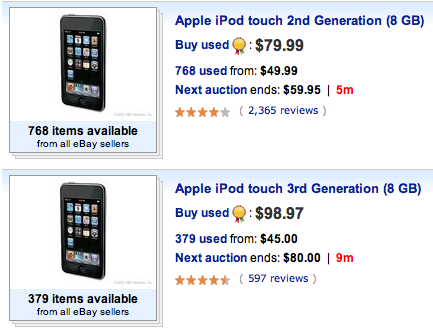
These are the exact same thing; iPod Touch model A1288. It would appear that sellers on eBay are profiting from this confusion; selling the mislabeled 2nd gen iPod Touch for a higher price than the correctly labeled 2nd gen 8GB iPod Touches. Whether this is intentional or not is difficult to say, but it is something you should be aware of if you're in the market for a used iPod Touch.
In my case the seller was friendly and willing to accept a refund, but not everyone might be so fortunate.
Bottom Line
If you're looking to buy a used 8GB 3rd generation iPod Touch (or any used iPod Touch, really), refer to Apple's page on "Identifying iPod Models" first to make sure you know what you're looking for, and don't end up paying more than you should.
What's That Colour? /

Ever need help telling what a colour is?
What's That Colour to the rescue!
Just tap to find a colour name, as well as RGB values for anything you can point your camera at.
Get it now!
Sketch : Review /
I've been messing around with Inkscape lately, just for fun. But what's not fun is seeing your Core i7 iMac struggling to redraw your document while zooming in. You see, Inkscape isn't multi-threaded. So, during intensive tasks I'll just see a single core at 100% while the other 7 are just chilling, presumably talking smack about integers.
Thus began my search for a cheap, Mac-native vector drawing application. And after a grueling 10 minute search of the internets, I decided to try out Sketch.
Initial Impressions
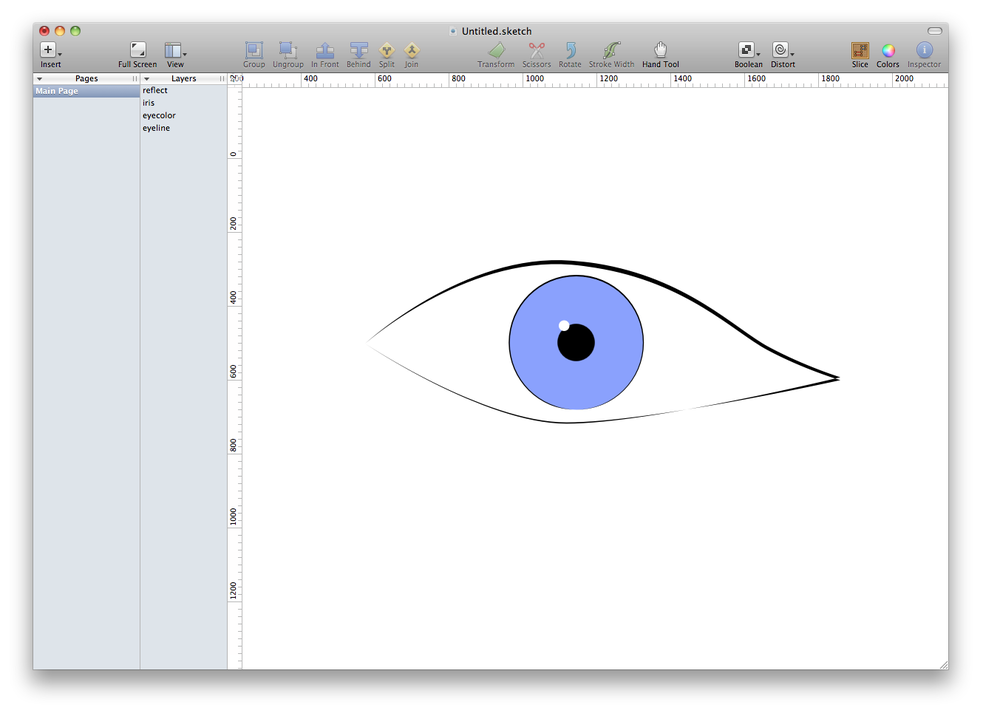
Sketch touts "Infinite Size" documents as one of its features. When you open Sketch, you have an infinite sized canvas on which to do your vector drawing thing. When you've achieved something worth exporting, you make a "slice" or selection of your canvas to export. That's nifty.
I was using a mouse when I started up Sketch, and was going nuts trying to find a way to scroll around the canvas. I went into the toolbar configuration, and found that there was indeed a hand tool; it just wasn't in the default toolbar. "Why is that?", I wondered. But switching to the Magic Trackpad, I was easily able to scroll and zoom my way around using the two-finger scroll and pinch. It seems Sketch was made for use with the trackpad, so that's something to keep in mind.
Sketch has a stroke width tool that's easy to use, and the transforms (stretch, scale, skew) are easy to apply. But that's where the ease stops.
Annoyances
I spent a few minutes trying to figure out how to select a vector I'd already drawn. Not modifying it; just selecting it. You see, Sketch doesn't have a mouse tool. Whenever I tried to select a vector, I'd find myself applying the effect of whatever tool I had selected. It wasn't until I realized I had to deselect my current tool, that I could select elements. That was annoying.
Also, Sketch seems very green; it feels buggy in places. Selecting layers and then deleting them doesn't always work on the first try. Additionally, a reference layer I had put in the document and hid, wouldn't then un-hide. Useful.
Which brings me to the layers. Sketch definitely supports layers, but that isn't apparent when you open up the application. You have to enable layers in the View menu. And once you have your list of layers, you might be inclined to order them… Well, good luck with that.
For whatever reason, Sketch has decided to make the process of ordering layers as maddening as possible. You might assume that sending a layer backwards, would change the relative order of the selected layer. Guess again! Rather, in order to send a layer backwards, you must first click the behind tool, then click on the layer you want your selected layer to go behind. Get it? It's so intuitive!
Sketch also includes a set of distortions:
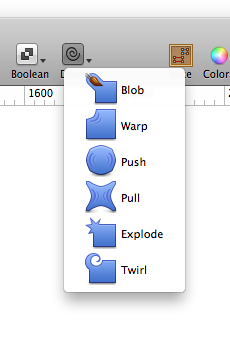
These distortions are easy enough to use, but they aren't very precise. Thus, I don't really find them that useful. But you know what are useful? Bezier handles.
In working with already made vectors, I found it difficult to grab the Bezier handles; sometimes they were easily visible, other times they weren't.
Bottom Line
Sketch seems very promising, and I look forward to updates and seeing where it goes. But for right now, I'll put up with the sluggishness and stick with Inkscape.
Sketch is made by Bohemian Coding, and is available on the Mac App Store for USD 39.99.
Apple & Google: Different Goals /
Apple's goal has been to achieve maximum profit from the sale of hardware:
"Apple captured two thirds of available mobile phone profits in Q2"
Success.
Google's goal has been to increase the number of eyeballs looking at ads, growing the search market:
"Android takes almost 50% share of worldwide smart phone market"
Success.
Everybody wins. I don't see what all the bickering is about.
USBFever 2x Optical Lens for iPhone 4 Review /
I've been snapping some pictures on my iPhone 4 recently. The iPhone 4 is a great casual camera, but I've been running into situations where I wish I had just a bit of zoom. The iPhone doesn't have any optical zoom abilities. What it does have is a ditigal zoom, which produces a very pixelated and ugly result.
After doing some searching, I recently picked up the 2x Optical Zoom lens from USBFever. In my search, I'd found that there were lenses that offered up to 12x zoom (again, which you can get from USBFever). But, besides being rather bulky, these lenses require a tripod. Anyone who's tried taking a steady picture with a smartphone camera knows the difficulties of trying to hold the phone steady. Stick a 12x zoom lens on that phone, and it's not humanly possible to hold the phone steady enough in your hand. But my goal was to get something which I could easily snap on or off in casual use, and lugging around a giant lense and a tripod doesn't seem that casual to me. At that point, you might as well carry around a real camera.
So, a week after ordering, the lens found itself to my door from Hong Kong ready to take for a spin.
The lens itself is screwed in place onto a specialized iPhone case which comes included in the package. The idea is that you keep this case on your iPhone at all times, and then just screw in the lens whenever you need it. I actually really like the case, so that won't be a problem.

General Use
After taking some shots, a few things became apparent. First of all, it does indeed zoom. But there's also a very noticeable distortion around the edges, accompanied by a vignette effect. The distortions are more noticeable in some shots than in others.


Comparisons
Without lens:

With lens:

Without lens:

With lens:

Conclusions
The distortions will have to be something I keep in mind when deciding whether to use the 2x lens, but I like having the option when I want to see something a bit more closely.
Lion: Quit Without Auto Resume /
Mac OS X Lion introduced a feature that allows applications to restore the exact state of the program when quit. So, the next time you open the application, every document, window, and panel will be right where you left it. But what if you want to quit an application and DON'T want to see all those windows again? Apparently you can override the auto resume behavior, by using the key cominbation:
Command(Apple) + Option + Q
Messing around with Inkscape /

Spring Grove Cemetery /

Rainy Day at Eden Park /