So I recently ran into a snag while trying to implement a UIActivityIndicatorView. There's a great and simple explanation of how to do it on the Apple Developer forums. This is how you're supposed to do it: you tell the UIActivityIndicatorView what method should be run in between starting animation and stopping animation.
My problem was that the code to be run in between starting and stopping animation wasn't in a method I could point the UIActivityIndicatorView to. The purpose of the pinwheel animation was to let the user know that their iPhone hadn't died while trying to render Javascript.
You see, the app I was working on had some HTML tables that needed to have some work done on them before they were decent for public consumption. So, that work was done with a Javascript and when the table was ready to be seen, the table would be made visible to the user. But, until the table was ready to be seen, the user was just looking at a blank screen for a few seconds.
Anyway... I needed a way to start a UIActivityIndicatorView when a view was loaded and then be able to hide it, without the use of threads. However, I couldn't find any good solutions. So this is what ended up working for me:
In the view you want to have the UIActivityIndicatorView to show up in, go to your interface (.h) file and define the UIActivityIndicatorView:

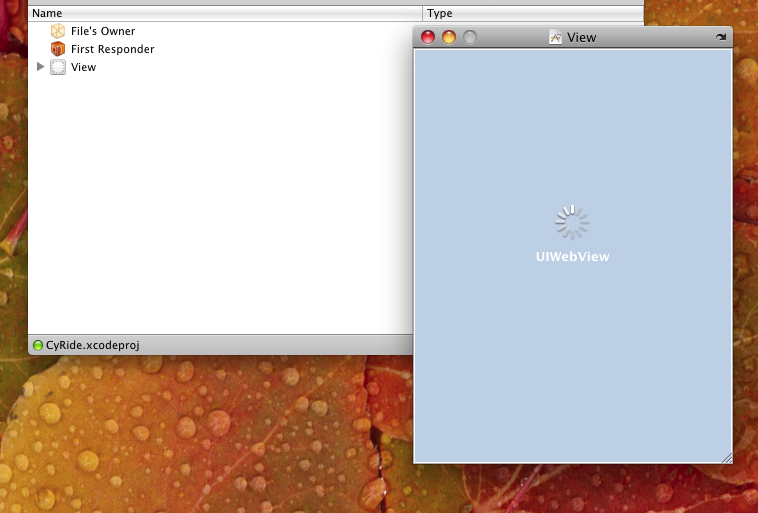
Now open up your NIB (.xib) file in Interface Builder. Plop a UIActivityIndicatorView onto your view and place it where you want:
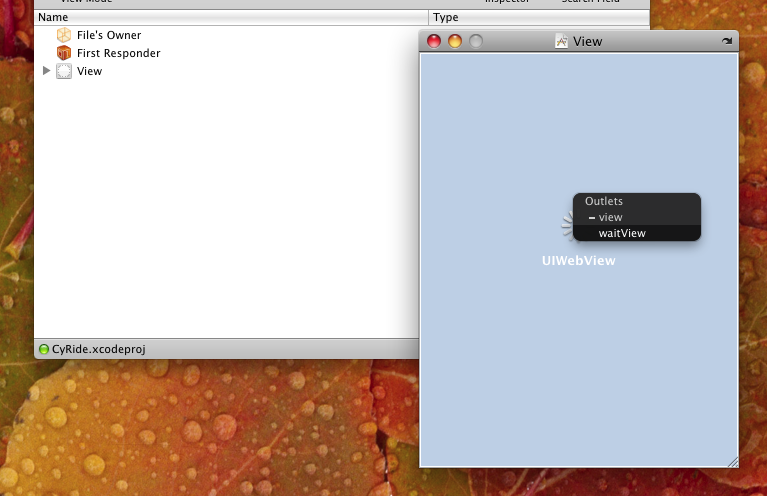
Go ahead and make the connection to the UIActivityIndicatorView from the IBOutlet we just defined:
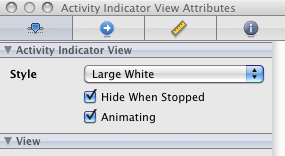
Now, with the UIActivityIndicatorView selected, go to the Attributes Inspector. There, make sure the "Hide When Stopped" and "Animating" checkboxes are checked:
Save your NIB and go to your view's implementation (.m) file. What we've done so far is set up a UIActivityIndicatorView to show up as soon as your view loads and begin spinning, but now we need to stop it when we want. So now just tell the UIActivityIndicatorView to stop animating when appropriate:
